To attack, all hackers need are your credentials.
 |
| By: Gary Glover |
 Remote computer access is one of the best ways to access work files from home, an airplane, a customer service center, an outside IT consultant, or abroad. Remote access allows a user to access a corporation’s network, and all the files, information, and sensitive data on that main corporate network, computer, or local area network.
It allows a user on one computer to see and interact with the remote system and sometimes even see the actual desktop interface of another computer without being physically present. Sometimes remote access is implemented using an organization’s virtual private network (VPN).
Common remote access applications include:
- Windows Remote Desktop
- Apple Remote Desktop
- pcAnywhere (Symantec)
- Laplink Gold
- GoToMyPc
- LogMeIn
- TeamViewer
- Join Me
- UltraVNC
- TightVCN
Remote access technology has been turned against us by cybercriminals.The technology we use to provide authorized access to sensitive data held by corporations has become one of the most exploited IT resources of all time.
 Tweet
TweetHackers can easily hack remote access
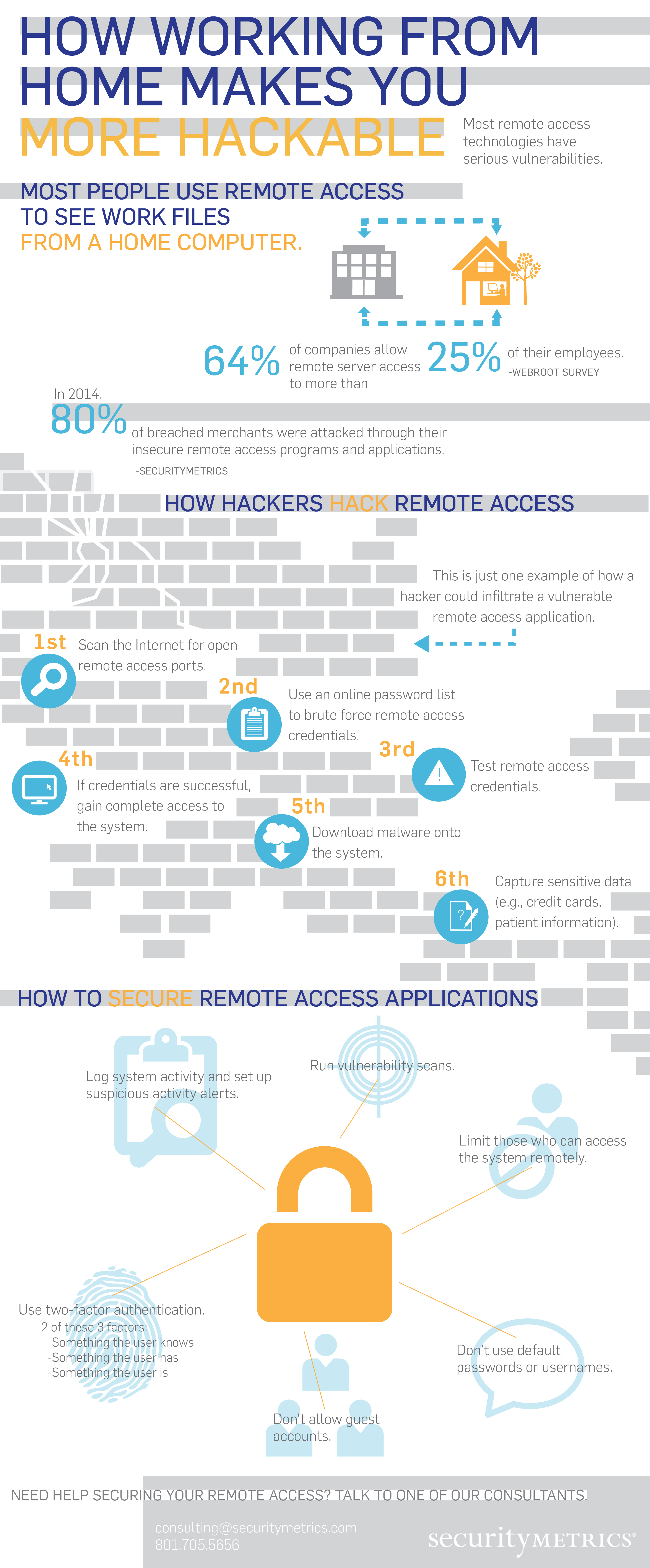
It’s common knowledge that the remote access applications listed above usually use these ports: 3389, 5631, 5632, 443, 80, 5900. To find a target, all a hacker has to do is scan for those specific ports to see if they’re open. An open port means remote access is used on that network.All remote access applications are vulnerable to cyber attack, mostly because of the way they were configured by default. If hackers already know which ports you are using to connect with remote access, all that’s left to attack are your individual credentials. All too often, these individual credentials are weak and easily guessable. Even worse, some system default passwords weren’t changed at the time of install.
I’m sure you’ve seen news stories about hackers stealing usernames and passwords to create massive libraries of billions of username/password combinations. (Did you hear about the Russian hackers who have over a billion Internet passwords?)
All it takes is a free brute force tool to automatically try each combination for them on your remote access connection. There are lists published on the Internet that contain common default passwords for many types of applications, network hardware, and operating systems.
Once the hacker has successfully found the correct password/username combination, he opens the remote access application, logs in, and uses your computer as a starting point to move throughout the entire organization.
How to secure remote computer access
As you can see, the remote access problem starts with weak identity validation and authentication.There are multiple ways to secure remote computer access applications, but the best way (by far) is implementing two-factor authentication. This means two different forms of authentication are necessary to access an application, to make sure you (and only you) get access.

Two-factor authentication must contain two of the following:
- Something only the user knows (e.g., a password) (your username doesn’t count)
- Something only the user has (e.g., a cell phone or RSA token)
- Something the user is (e.g. a fingerprint)
Here are a few great examples of two-factor authentication in practice:
- You enter your username and password to a third party remote access service and call in to the onsite location IT department to have them also login and grant you one time access (often requires them to give you a PIN verbally to receive access). They verify your identity, and you are authorized for access.
- You enter a password and then the remote access application sends your cell phone a unique PIN that expires in 60 seconds. You enter the PIN into the remote access application and gain access.
- You enter your username and password, and the system prompts you for a unique dynamic number found on an electronic device in your possession (Key fob, Google authenticator on smart phone, etc.)
- You enter your username and password, and the system prompts you for a biometric value (like a fingerprint), and you touch the fingerprint reader
Gary Glover (CISSP, CISA, QSA, PA-QSA) is Director of Security Assessment at SecurityMetrics with over 10 years of PCI audit experience and 25 years of Star Wars quoting skills. May the Force be with you as you visit his other blog posts.